
Introducing AIRLIFT Forms
Better public intake.
Fewer manual handoffs.
Build and publish branded forms with AIRLIFT® Forms. Process responses, documents, and data through AIRLIFT Connect pipelines into the systems your agency already uses.
- Create
- Branded forms
- Share
- Link or embed
- Process
- Connect pipelines
- Track
- Every import
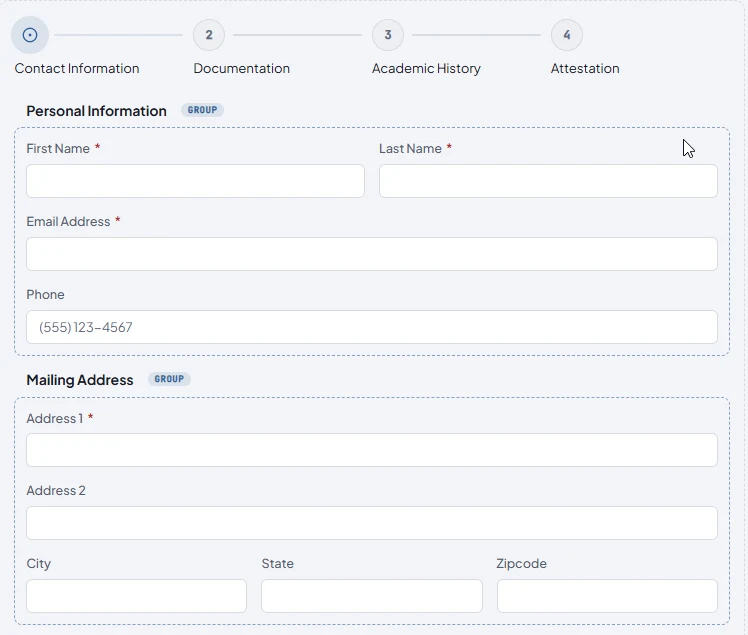
New / public web intake
Your forms.
Your website.
Your workflows.
Give people a clear way to apply, request help, or send supporting documents. Visually build the intake your agency needs, share it by link or embed it on your website, and let Connect process the response.
- Guide the responseSteps, conditional fields, validation, and repeated groups.
- Keep data and documents togetherStructured responses and uploaded files enter the same workflow.
- Make it your ownReusable account branding with design controls for each form.
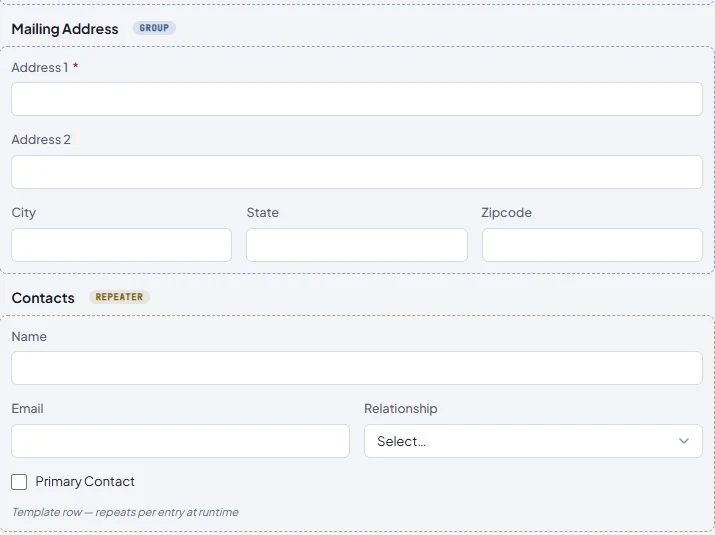
Available today / governed integration
The work after
“Submit.”
Connect captures events from AIRLIFT Forms, e-signature platforms, and web services. Its pipelines transform documents and data, deliver to configured destinations, and give staff a readable timeline for every import.
Keep the tools your agency already uses. Replace the downloading, renaming, packaging, and uploading between them.
Explore AIRLIFT Connect
Acrobat Sign · Docusign · airSlate SignNow
Box · FTP ·
outbound web services

From public form to
processed record.
Forms handles the intake. Connect handles the configured processing and delivery. Staff follow the work in Connect's existing Imports view.
- 01
Build
Arrange fields, steps, and rules. Apply your branding and preview the respondent experience.
- 02
Publish
Share a direct link or embed the form in your website. People respond without a Connect account.
- 03
Process
Accepted responses enter each assigned active pipeline for transforms and destination delivery.
- 04
Observe
Track every resulting import through its stages, including delivery status and retry behavior.
Better intake.
Less work between systems.
Applications and onboardingForms → Connect pipelines Guide people through an application, collect supporting documents, and send the response into the configured agency workflow.
Requests for serviceWebsite intake → configured delivery Place a branded request form on your existing website and deliver structured responses to the systems your staff use.
Completed e-signature recordsE-signature provider → Connect Capture signed documents from a configured provider, package the records, and track delivery to the receiving system.
Keep work moving.
Keep control.
Connect gives teams the visibility to support daily work, with agency-level separation, role-appropriate access, protected integration credentials, and readable operational timelines.
- Role-appropriate access
- Staff can monitor and support pipeline activity according to their responsibilities, while sensitive administrative controls remain restricted.
- One operational view
- Forms submissions become Connect imports, with the same progress history, destination status, and retry behavior as other sources.
- Deliberate publication
- Editing a Forms draft leaves the published form unchanged. A new publication deliberately updates the public revision.
A connected foundation.
A growing family.
Connect provides the integration foundation. Forms adds public intake as a separately licensed Connect capability. Case Management, Content Management, Portal, and Enterprise remain in development.
- 01AIRLIFT FormsVisual, branded public web intake that feeds configured Connect pipelines.New · for Connect
- 02AIRLIFT ConnectGoverned pipelines for capturing, transforming, delivering, and tracking documents and data.Available now
- 03AIRLIFT Case ManagementWorkflow automation, approvals, tasks, and reporting for agency case operations.In development
- 04AIRLIFT Content ManagementRecords and document management with pluggable storage, classification, and redaction.In development
- 05AIRLIFT PortalCitizen- and staff-facing portal access across heterogeneous sources.In development
- 06AIRLIFT EnterpriseUnified composition of the AIRLIFT family with shared identity and governance.In development
Built by a public-sector software team.
cloudPWR has served the public-sector software market since 2011. AIRLIFT products serve regulated registry workloads today — including the South Dakota Medical Cannabis Registry.
Read about cloudPWR- memberGovRAMP memberPublic-sector cloud community.
- certSOC 2 Type IIIndependent control attestation.
- govWA OCIO approvedWashington State Office of the CIO.
- hipaaHIPAA postureFor regulated registry workloads.
Frequently asked questions.
- What is AIRLIFT?
- AIRLIFT is a cloudPWR product family for public-sector software. Connect provides governed integration pipelines, and Forms adds public web intake within Connect. Case Management, Content Management, Portal, and Enterprise are in development.
- How do Forms and Connect fit together?
- AIRLIFT Forms is a separately licensed capability of AIRLIFT Connect. Authors build and publish public forms in Connect. Each accepted response becomes an import in every eligible active pipeline assigned to the form.
- Who is AIRLIFT built for?
- AIRLIFT is built for state and local government agencies that need clear public intake and governed movement of documents and data across existing systems.
- Can we keep the systems we already use?
- Connect supports configured sources, transforms, and destinations, including e-signature providers, Box, FTP, and web services. Integration availability varies by deployment and customer configuration.
- Can one form feed more than one workflow?
- Yes. One form can feed multiple active Connect pipelines. Each eligible assigned pipeline receives its own import, with its own processing and delivery progress.
- Who builds AIRLIFT?
- AIRLIFT is built by cloudPWR, a public-sector software company founded in 2011 and based in Post Falls, Idaho. Contact the team to discuss Forms licensing and your agency’s deployment needs.
Bring your next intake.
We’ll walk the workflow.
See how Forms and Connect fit your agency's work, from the public form to processing, delivery, and the import timeline.